Apple
Ugreen's AirTag Rival Is Louder, Cheaper, and Impossible to Open
A breakdown of how Ugreen's Find My–compatible trackers stack up against Apple's AirTag on price, battery, loudness, and water resistance.
- Author
Gadgion
- Published
- Filed under
- Apple
How much does a Ugreen FineTrack cost compared to an AirTag?
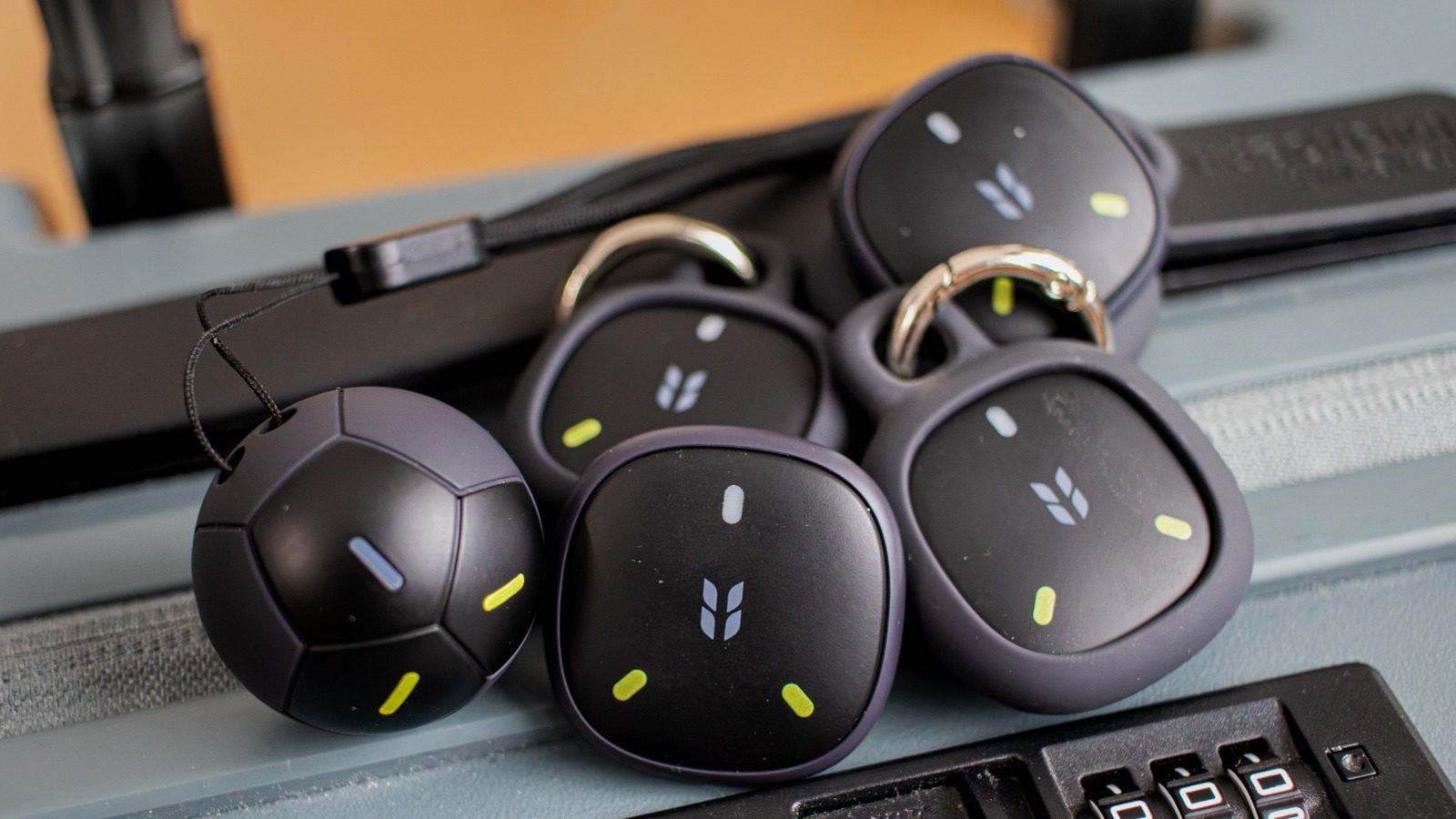
The Ugreen FineTrack 2 sells for $19.99 on its own, and a four-pack of the smaller FineTrack Mini 2 runs $45.99. Apple's AirTag retails at $29 for a single and $99 for a four-pack, so the Mini 2 four-pack undercuts Apple by more than half. The FineTrack 2's single price is about 30% lower than an AirTag. Both Ugreen trackers ship with the mounting hardware you'd otherwise pay extra for on an AirTag: the FineTrack 2 includes a pre-installed strap plus a spare, and each Mini 2 comes with a silicone sleeve and key ring. AirTags themselves have no hole for a key ring, so you'd need to buy a separate loop or holder. With discounts frequently appearing on Amazon and Ugreen's site, the gap can widen further.
Do Ugreen FineTrack trackers work with Android phones?
No. The FineTrack 2 and FineTrack Mini 2 are locked into Apple's Find My network and will only pair with an iPhone, iPad, or other Apple device running the Find My app. There is no Android companion app, and they are invisible to Google's Find My Device network. If you carry an Android phone, these trackers are useless to you; you'd need a Tile tracker, which has worked with both iOS and Android since 2014. The Ugreen's Find My integration is exactly why they're cheaper — they piggyback on Apple's existing crowd-sourced locating infrastructure instead of building their own. That also means an Android user can't even trigger a lost mode alert. For Apple households, this is a non-issue; for anyone with mixed Android/Apple families, it's a dealbreaker.
How long does the battery last in a Ugreen FineTrack?
Ugreen rates both of its trackers at up to seven years on a single sealed battery. There is no user-replaceable battery, no USB-C port, and no wireless charging — the enclosure is sealed shut. Apple's AirTag, by contrast, uses a replaceable battery that lasts just over a year, and you have to change it yourself. The Ugreen's trade-off is that when the battery dies, the tracker is dead for good. Seven years, however, typically outlasts two iPhone upgrade cycles, so you'll likely replace the tracker before it fails. The sealed design also contributes to the IP68 rating, as there's no battery door to break the seal over time. If you're the type who loses track of replacement batteries, the Ugreen eliminates that chore entirely.
How loud are Ugreen trackers compared to AirTags?
Both Ugreen trackers emit a chime that peaks at 110 decibels, while Apple's second-generation AirTag is rated around 100 decibels. A 10-decibel difference represents a doubling of perceived loudness, according to Siemens, so the Ugreen sounds roughly twice as loud to human ears. That extra volume is a practical advantage when the tracker is buried in a coat pocket, wedged under a car seat, or at the bottom of a gym bag. In the Find My app, you tap "Play Sound" and the tag starts ringing; the Ugreen's tone cuts through ambient noise noticeably better than an AirTag's. The louder speaker doesn't appear to sacrifice battery life — Ugreen still claims seven years. For anyone with hearing loss or who frequently misplaces keys in noisy environments, the 110dB rating is a meaningful upgrade.
Are Ugreen trackers waterproof?
Yes, both Ugreen trackers carry an IP68 rating, meaning they've been certified to last longer underwater than an AirTag, which only manages an IP67 rating. The key difference lies in the sealed construction: because there's no user-replaceable battery door, there's no weak point for moisture to seep through over time. AirTags require you to pry open the case to swap in a new battery, and that repeated opening can wear down the seal, compromising water resistance. In practice, this means the Ugreen can handle being clipped to a water bottle, tossed in a beach tote, or left in a backpack during a rainstorm without worrying about a leak. The IP68 rating also covers dust and particles, so it's just as sturdy on a dusty trail or a construction site. If you're someone who tends to expose your gear to the elements, the Ugreen's higher rating and permanent seal offer straightforward peace of mind — no extra cases or careful handling required.
How do you set up a Ugreen FineTrack?
Setup takes less than five minutes, but it isn't as automatic as an AirTag's near-field pairing. You first press and hold a hidden button on the tracker — on the FineTrack 2 it's the panel embossed with the Ugreen logo; on the Mini 2 it's the logo itself — until you hear a musical chime. That puts the tracker into pairing mode. Then open the Find My app on your iPhone or iPad, tap the plus icon, select "Other Item," and tap Connect when the tracker appears. You'll give it a name, pick an emoji, and agree to link it to your Apple ID. A quick-start guide and a multilingual manual are included in the box, covering pairing and factory reset. One quirk: performing a factory reset seemed to power the tracker off entirely, leaving it listed as "Item Not Reachable" until you power it back on and re-pair.
What's the difference between the FineTrack 2 and the Mini 2?
The FineTrack 2 is shaped like a miniature soccer ball, a design Ugreen calls "World Cup inspired," with a pre-installed strap that loops through the ball's ridges. A spare strap is included, but swapping it requires cutting the old one off. The Mini 2 is a flat, puck-shaped tracker with roughly the same diameter but about three times slimmer. Each Mini 2 ships with a silicone sleeve and a key ring, so you can attach it to keys or a zipper pull without extra hardware. The soccer-ball look of the FineTrack 2 makes it less recognizable as a tracker — it could pass for a toy or a decorative fob — while the Mini 2 reads as a typical Bluetooth tag at a glance. Both use identical internals: same speaker, same IP68 rating, same seven-year battery claim. The choice comes down to whether you prefer the more conspicuous but easier-to-grab ball or the lower-profile disk.
Do Ugreen trackers support precision finding like AirTags?
No. The FineTrack 2 and Mini 2 lack the ultra-wideband (UWB) radio that Apple uses for its "Find Nearby" feature, which displays a directional arrow and distance meter on iPhone 11 and later models. Without UWB, the Ugreen trackers rely solely on Bluetooth-based crowd-sourcing: when any Apple device passes within range, it reports the tag's location to iCloud. In the Find My app, you see the last known map location, but no on-screen guidance for walking around a room. To compensate, the Ugreen's speaker is louder than the AirTag's — 110dB versus about 100dB — so you can play a sound and follow your ears. That's sufficient for finding a set of keys stuck between couch cushions. For locating a suitcase in a crowded terminal, you'll have to use the map pin and hope the Bluetooth signal refreshes as you approach.