 Computing
Chromebooks that hold up: the best of 2026, from $200 to 19-hour battery
Computing
Chromebooks that hold up: the best of 2026, from $200 to 19-hour battery
Life
Dell's $450 discount: 8 specs that define the value and the compromise
The laptop drops to $550 with an eight-core CPU, 16GB RAM, and a 120Hz screen, but the 720p webcam and missing backlight show where Dell cut corners.
- Author
Gadgion
- Published
- Filed under
- Life
The price drop that changes the comparison set
- Price: $550 from $1,000
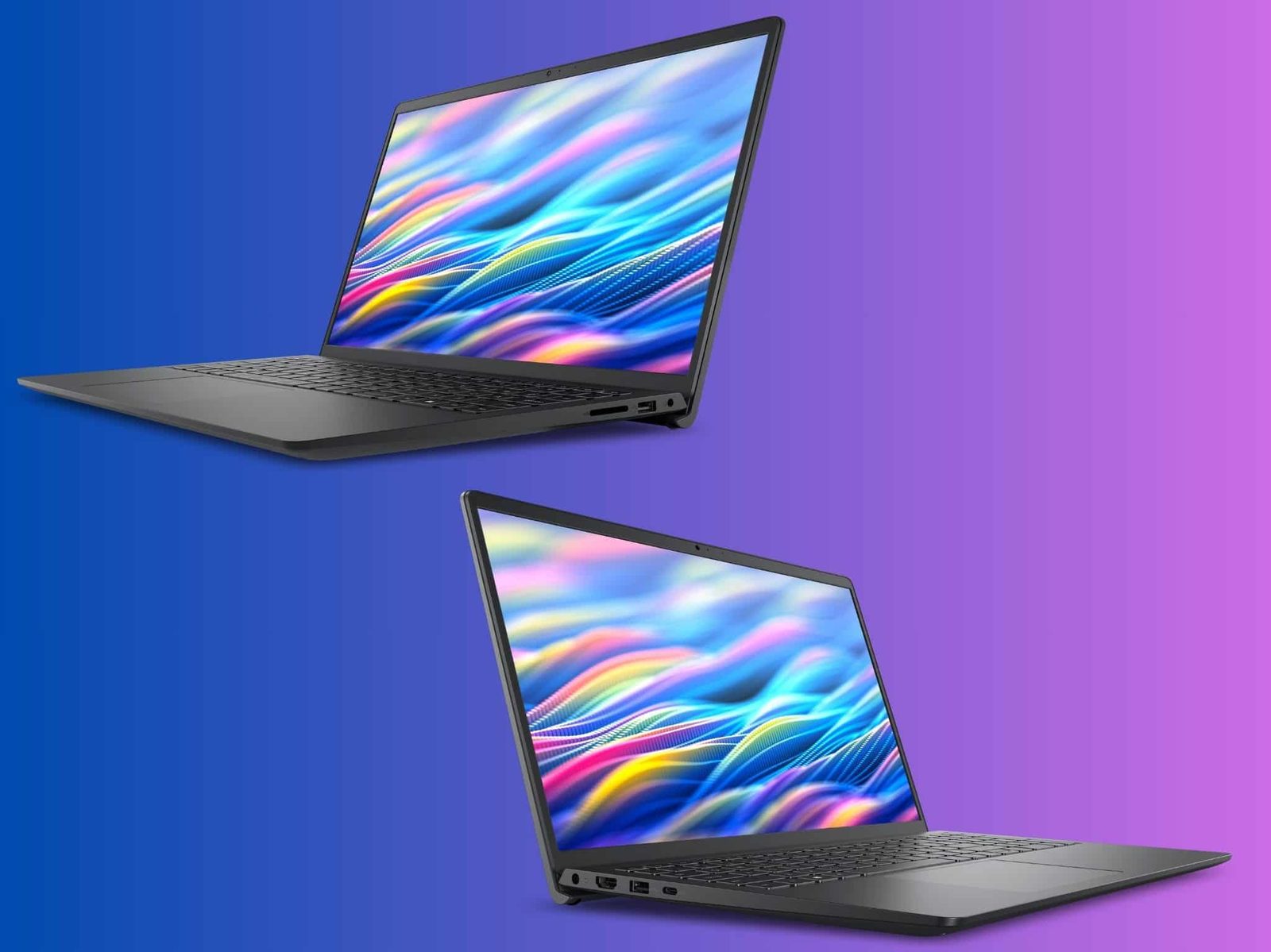
Dell's Back to School Sale has cut the Dell 15 Laptop from $1,000 to $550, a $450 discount aimed at students and everyday office work. That $550 price changes the competitive set: a full-size machine with premium internals now sits alongside smaller, often slower Windows laptops in the same price band. The sale price is the headline, but the listing also documents a few compromises that are easy to miss when the discount is this large. The $450 saving is the biggest single number in the listing, and it makes the rest of the component choices worth evaluating. At $550, the Dell 15 stops being a premium purchase and becomes a practical back-to-school buy; the question is whether the tradeoffs fit how you actually work. The discount is deep enough that a student could use the saved money on a mouse, a sleeve, and an extended warranty without pushing the total back to the original sticker price.
Eight-core AMD Ryzen 7 for multitasking
- Processor: AMD Ryzen 7 7730U, 8
The processor is an AMD Ryzen 7 7730U with eight CPU cores, which is more than many laptops at this price carry. That core count matters for the way students juggle tasks: a browser with a dozen tabs, a word processor, a spreadsheet, and a video call can each get a slice of the CPU without forcing the machine to wait. The model number matters because not all Ryzen 7 chips behave identically; the 7730U is the exact part Dell uses here, and its eight cores are the reason daily multitasking feels smooth. For someone coming from a dual-core budget laptop, the jump is immediate: background tasks don't stall foreground work. The processor is the first thing to check in the spec sheet because it sets the ceiling for how long the machine stays usable. Eight cores is the concrete figure, and it separates this laptop from the four-core alternatives at similar prices. That alone justifies reading past the sale price.
16GB DDR4 RAM instead of the usual 8GB
- Memory: 16GB DDR4
Memory is where this laptop pulls ahead of many affordable machines: Dell includes 16GB of DDR4, double the 8GB that appears in a lot of budget notebooks. The practical effect is more open applications before the system starts swapping to storage. A student might keep a research paper, a citation manager, a chat client, and an online meeting open at once; 16GB gives the OS room to keep all of it in RAM rather than hitting the storage constantly. DDR4 is not the newest standard, but it is cheaper and stable, and the capacity matters more than the generation for everyday work. The 16GB number is the one to remember when comparing configurations; it means the laptop can handle the kind of multitasking that stalls 8GB systems. It is also a sign that the discount does not come from cutting memory corners.
1TB PCIe NVMe SSD for fast boots and long-term files
- Storage: 1TB PCIe NVMe SSD
Storage is a full 1TB PCIe NVMe SSD, the kind of drive that boots quickly and loads applications without long waits. One terabyte is enough for lecture recordings, project files, and a large photo or video folder, which is why it matters on a school laptop. PCIe NVMe is the interface standard behind the fast boot and load times Dell lists for this model. The 1TB capacity is a concrete differentiator; it is a roomy amount for a laptop in this price class, and it removes the need to carry an external drive for routine files. The fast load times are the immediate payoff, and the capacity means the laptop can stay useful for several years of files. It is the least glamorous spec in the list but the one that most directly affects daily use.
15.6-inch 120Hz IPS display with anti-glare
- Display: 15.6-inch, FHD, 120Hz,
The screen is a 15.6-inch Full HD panel with a 120Hz refresh rate, an IPS layer for wide viewing angles, and an anti-glare coating that cuts reflections. The 120Hz refresh rate makes scrolling through documents and web pages feel fluid, which is a real benefit for long research sessions. Full HD at 15.6 inches is a commonly used resolution, and the IPS layer keeps colors consistent when you move off-axis. The anti-glare coating reduces distracting reflections, a feature Dell specifically lists for this model. That combination fits writing papers, researching assignments, and streaming after class. The 120Hz figure is the concrete spec to remember; it gives the screen a smoother feel than the usual office display, even though this is not a gaming panel. The anti-glare coating is the part that matters most in bright rooms. Wide viewing angles also make it easier to share the screen with a classmate.
Ports: USB-C, USB-A, HDMI, but check the USB-C
- Ports: USB-C data-only, 2x USB-A
Port selection includes one USB-C, two USB-A, HDMI 1.4, and a universal audio jack. That covers most everyday setups: a mouse in one USB-A, a flash drive in the other, HDMI to an external monitor, and wired headphones in the audio jack. The catch is the USB-C port supports data only. It is not intended for charging or video output, so you cannot use it as a single-cable dock connection or as the laptop's charging port. That is a concrete compatibility detail to factor in before buying a USB-C hub. The two USB-A ports give the machine a more traditional feel, and HDMI 1.4 connects to external displays. The universal audio jack accepts typical headsets. For a back-to-school laptop, the port layout is practical, but the data-only USB-C is the one spec that can surprise someone expecting modern USB-C versatility. If you plug a USB-C display or charger into that port, it will not receive a signal or current.
720p webcam and stereo speakers for online classes
- Webcam/Audio: 720p HD, stereo sp
Video calls get a 720p HD webcam and stereo speakers. For online classes and job interviews, the webcam resolution is enough for a clear picture, though it is not a high-end sensor. The stereo speakers provide more presence than a single mono driver, which helps with hearing an instructor or a video call without external speakers. Dell equipped this laptop with both components because remote school work depends on them. The 720p figure is the concrete benchmark; it is the default for this class of laptop, and it means you should rely on good lighting rather than camera quality. The stereo speakers are the audio half, and together they make the laptop a practical tool for Zoom-style meetings. If you plan to use this as a primary study machine, the webcam and speakers are the parts that carry the videoconferencing load. A good camera is useless if the audio is muffled, and the stereo pair is what keeps a lecture intelligible.
The non-backlit keyboard is the clearest cost cut
- Keyboard: no backlight
One omission stands out: the keyboard is not backlit. Dell's listing says so plainly, and it is a detail that matters for anyone who types after lights are off or in a dark dorm room. Backlighting is a premium feature, so its absence is part of the discount. The keys themselves are standard; there is no mention of extra features like a number pad or travel distance in the spec sheet. The practical effect is that you will need a desk lamp or a room light to see the keys at night. This is a compatibility question, not a performance question: if you rarely type in the dark, it may not bother you. But it is the kind of tradeoff that is easy to miss when a laptop is heavily discounted. The non-backlit keyboard is the clearest example of where Dell cut costs; backlighting is one of the first features to disappear when a manufacturer hits a lower price.
Keep going
Computing
Chromebooks that hold up: the best of 2026, from $200 to 19-hour battery
 Life
Govee's Back-to-School Sale Puts the Lantern Floor Lamp at $109.99—and That's Not Even the Best Price
Life
Govee's Back-to-School Sale Puts the Lantern Floor Lamp at $109.99—and That's Not Even the Best Price